For colorists and editors in DaVinci Resolve
Give clean footage a lens.
M3 Glass is a $19 OpenFX lens emulation plugin for DaVinci Resolve on Mac and Windows, with chromatic aberration, distortion, vignette, color cast and soft edges. Pick a lens and it sets all five together. Put it ahead of your grade.
$19 once Mac and Windows. Your download email has both installers.
Why add a lens?
Today
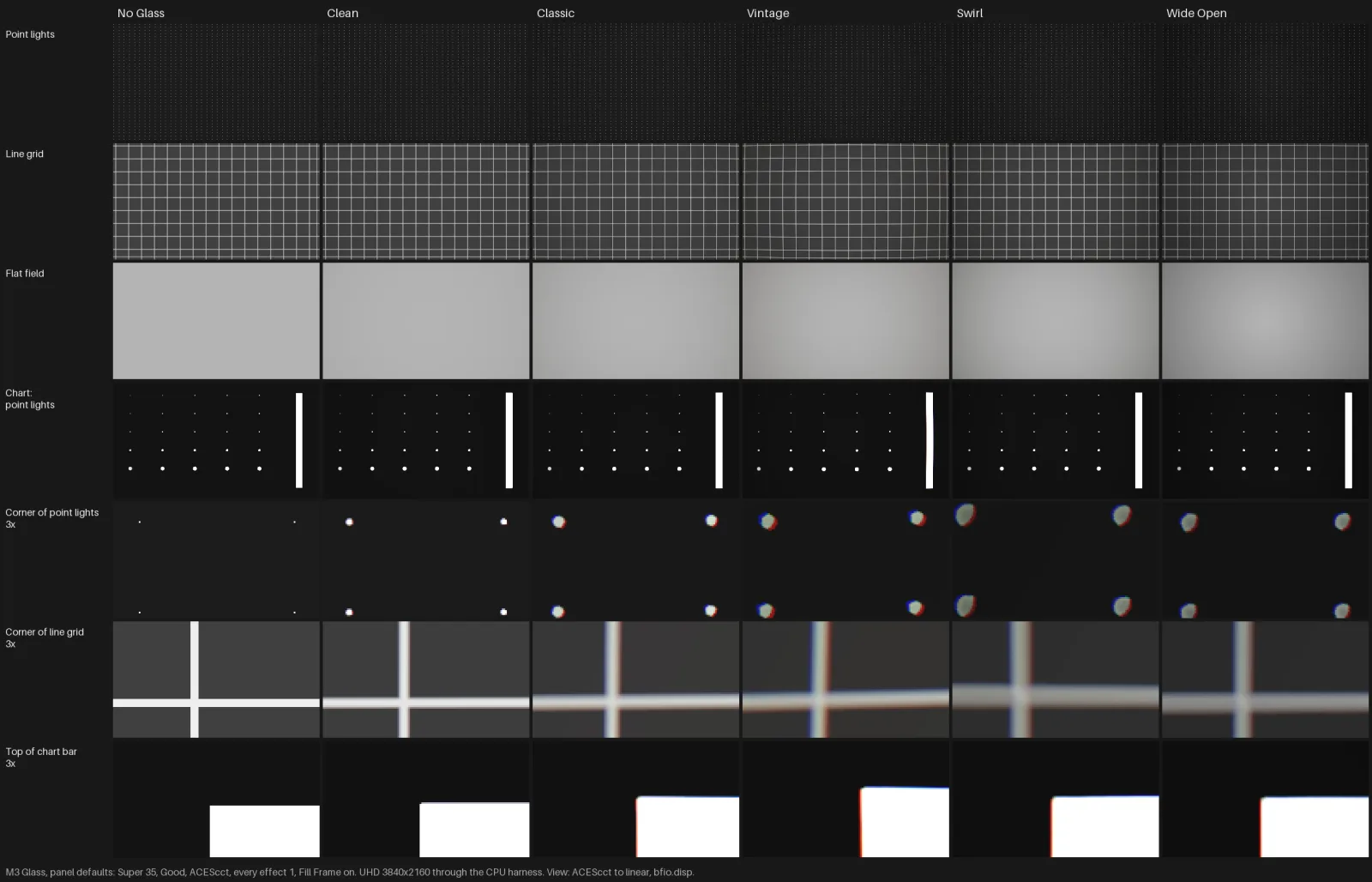
Digital footage is sharp and even from corner to corner. Real glass isn't.
With M3 Glass
M3 Glass bends lines toward the edges, darkens and tints the corners, fringes red out and blue in, and softens the edges while the center stays sharp. Pick a lens and every effect is set. Then turn any of them up or down.
How does M3 Glass work?
- 01
Install the package
Quit Resolve and run the Mac or Windows installer. Open Resolve and find it in the OpenFX panel under Monolith 3.
- 02
Put it ahead of your grade
On a node before M3-Film and the rest of your grade. If you use M3 Diffusion, it goes first, then Glass.
- 03
Pick a lens and set the sensor
Five lenses. Set Sensor to your camera's frame size: Full Frame, Super 35 or Super 16. A smaller sensor sees only the middle of the lens, so every effect shrinks.
- 04
Dial each effect
Amount fades the whole lens. Distortion, vignette, color cast, aberration and edge softness each run from 0 to 2.
What does each lens do?
| Lens | What it does |
|---|---|
| Clean | The lightest of the five |
| Classic | The default pick |
| Vintage | Bends straight lines the most |
| Swirl | The softest corners |
| Wide Open | The heaviest falloff |
Where does M3 Glass sit in the chain?
| M3 Diffusion | M3 Glass | M3-Film | |
|---|---|---|---|
| What it does | The filter in front of the lens | The lens itself | The film look |
| Order in the tree | First | Second | Third |
| Price | $19 | $19 | $49 |
What do you get?
- The M3 Glass OpenFX effect for DaVinci Resolve on Mac
- Five lenses, and five effects you can dial from 0 to 2
- A Fill Frame switch, so barrel distortion never shows black corners
- The Windows installer too, in the same email
- Setup steps by email, and a person to write to if you get stuck
Who isn't it for?
- Lens correction. It adds a lens, it doesn't remove one.
- Anyone not grading in DaVinci Resolve
What does M3 Glass cost?
Pairs with: M3-Film · M3 Diffusion · M3 Balance
Or get all four in M3 Coloring Tools.
Questions
How do I add chromatic aberration in DaVinci Resolve?
Chromatic aberration is color fringing: red pushes out and blue pulls in toward the corners of the frame. In Resolve you add it with an OpenFX effect on a node ahead of your grade. M3 Glass does this. Pick a lens, then turn Aberration anywhere from 0 to 2. The other four effects are set by the same lens, and you can dial each one separately.
What do I need to run it?
DaVinci Resolve on a Mac with macOS 13 or later, Apple silicon or Intel, or on Windows. We test it in Resolve 21.
Where do I put it?
On a node ahead of M3-Film and the rest of your grade. If you use M3 Diffusion, the order is Diffusion, then Glass, then Film.
How fast is it?
On an M2 Max, a UHD frame takes under 10 ms at Draft and under 30 ms at Good, whatever the lens. Grade at Draft, render at Best.
Does it run on Windows?
Yes. Your download email has a Mac link and a Windows link. The Windows version is new. If anything looks off, write to info@monolith3.studio.
The installer won't open. What do I do?
It isn't signed, so macOS may block it the first time. Open System Settings, then Privacy & Security, scroll down and click Open Anyway, then open the installer again. On macOS 15 and later, right-click and Open no longer works. On Windows, click More info on the warning, then Run anyway.
Is M3 Glass made by Blackmagic Design?
No. M3 Glass is an independent OpenFX effect from Monolith 3. DaVinci Resolve is a trademark of Blackmagic Design, which doesn't make or endorse it.